Is Cut Alert an attendance messaging tool for school administrators?
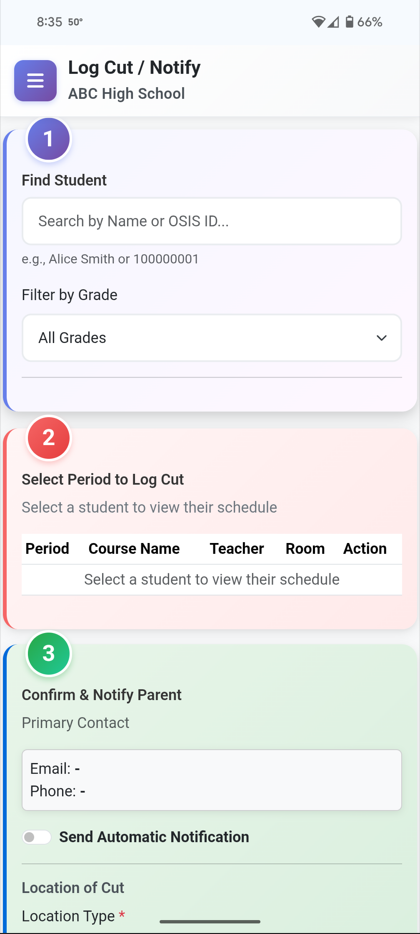
Yes. Cut Alert is built for attendance offices, deans, and principals who need real-time student attendance alerts—not a generic mass-communication app. Staff log class cuts or upload a daily absence list; parents receive automated email and SMS with your school’s branding. Every message is logged for follow-up and reporting.
Can Cut Alert replace robocalls for attendance?
Many schools use Cut Alert as a robocall alternative for attendance: instead of district-wide auto-dials, you send targeted, same-day messages when a student cuts a period or appears on today’s absence list. Families get email and text with clear, school-branded wording—not a generic phone blast.
How is Cut Alert different from other parent communication apps?
Cut Alert is centered on student attendance—same-day class cuts, daily absence notifications, proof parents were contacted, cut trends, print-ready reports, and support plans for follow-through. It also includes Send Custom Notifications: message selected students or saved groups, use saved templates, and email attachments (PDFs, flyers, or newsletter-style files) when you need broader outreach—on the same platform as your cut and absence workflow.
Does Cut Alert handle daily student absences?
Yes. On Daily Absences, upload today's absence list (CSV), review students, and send email and SMS to guardians in bulk—the same branded templates as class-cut alerts. When a parent calls back, staff log the reason and teachers can be notified automatically. Absences can appear on student cut reports for a complete picture.
What happens when a parent calls back about an absence?
After you notify families on Daily Absences, the results screen lets staff record the callback reason and optional return date. Cut Alert emails the student's teachers with that context. If absence patterns match rules you set in System Setup, the desk can suggest opening a support plan—your team decides when to act.
Can we set our own at-risk cut rules?
Yes. Each school configures minimum cuts, a rolling day window, and an optional same-period rule in System Setup. The dashboard's Students at Risk panel reflects your policy—not a fixed district default.
Will Cut Alert message families on holidays or PD days?
You can import off-days on the School Calendar (holidays, professional development, half days). Automated cut notifications can skip those dates so families are not contacted when school is not in session.
How do we get started?
Start with a demo so we can walk through cuts, daily absences, and your workflow. When you are ready to onboard, use school registration (or the link we send after your demo). We review each request and enable your site—typically within 24 hours.
How fast can we go live after approval?
Most schools upload student, contact, and schedule data via CSV, invite staff, and begin logging cuts and sending absence notifications within the first week. We guide you through setup and templates.
Do parents get email and text messages?
Yes. For class cuts and daily absences, Cut Alert can send both email and SMS based on your school's configuration and the contacts on file.
Can we use support plans for behavior—not just attendance?
Yes. Support plans are fully editable—add or remove interventions, choose from your school’s strategy library, and include behavior-focused interventions whenever you need them. Schools use plans for structured follow-up after attendance issues and to document behavior goals, strategies, and progress—much like a behavioral intervention plan (BIP). Attendance and parent notification remain the core of Cut Alert; support plans are the flexible follow-through layer on top.
Can we print cut reports for families?
Yes. On Student Cut Reports, select students and download one merged PDF for printing or a ZIP of individual PDFs for staff to email—reports are sorted A–Z by student name.
Does Cut Alert work with NYC DOE student data?
Yes. Schools can upload RESI, RCON, and schedule CSV files (NYC DOE and other formats). Student contacts, home language, and class schedules import into Cut Alert so attendance messaging matches the roster your office already uses.
Is our school data isolated from other schools?
Yes. Cut Alert uses secure multi-tenant architecture—your data, branding, and users are private to your school.